
KROSSWIND COMPUTER
Your airplane.
Your numbers.
Your next flight.
An offline flight computer and pilot toolkit that brings the math, the planning, and the details of aircraft ownership together.
Ask a question. Build a route. Check your loading. Keep track of the airplane behind every flight.
Coming soon to Android and iOS. The Android app is in beta testing now. Public release date and pricing to be announced.
FROM PREFLIGHT TO OWNERSHIP
A flight computer with room for the whole airplane.
Built for student pilots, everyday GA flying, and owners who want their aircraft information close at hand. Here’s a look at the features in the current app preview.
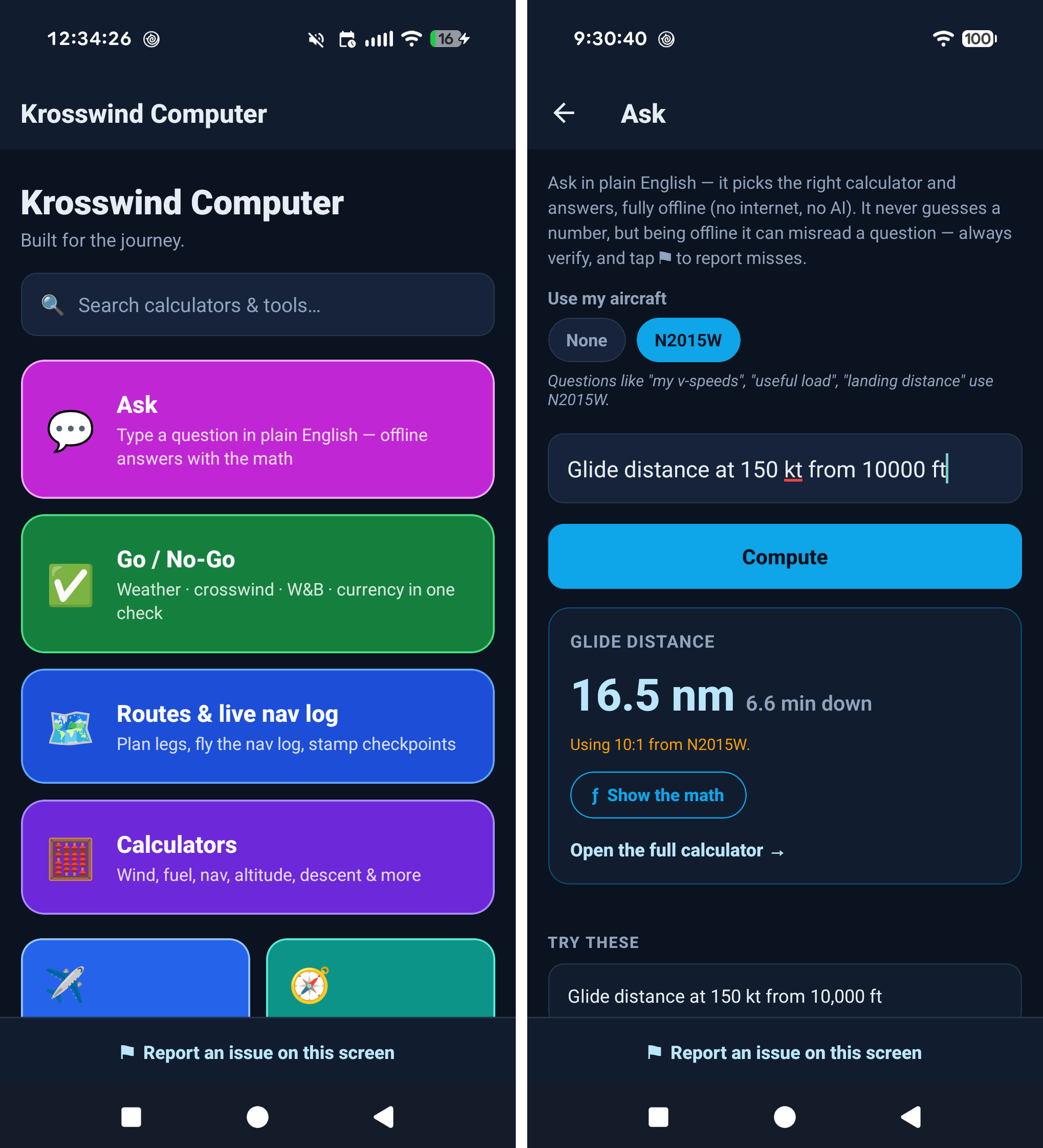
Ask in plain English
Type a supported flight-math question and get a calculated answer with the steps behind it. Ask works on your device, even without a signal.
Your aircraft, throughout the app
Save aircraft profiles with your own POH data: weights, speeds, fuel, loading stations, CG envelope, and cruise performance.
Plan, fly, and keep the record
Create routes, follow a checkpoint-based nav log, export planning sheets, and turn a completed flight into a logbook entry.
ASK + SHOW THE MATH
Start with the question you actually have.
Ask recognizes supported questions, selects the calculator, and uses your aircraft profile where appropriate. Suggested questions help you get started.
Expand Show the math to follow the formula, your inputs, and the result, with flight-school-style explanations. Ask runs locally without a cloud AI connection.
“Fuel burned 14.5 gph for 1:45”
“What’s my useful load after 50 gal fuel?”
“Crosswind runway 06 wind 100 at 18”
“How long to fly 142 nm at 150 kt?”
Check the interpreted inputs before using an answer.PLAN THE FLIGHT
Your route, loading, and conditions in one toolkit.
Aircraft profiles
Keep multiple aircraft with user-entered identity, V-speeds, fuel capacity, weight limits, loading stations, CG envelopes, and cruise TAS/fuel-flow tables. Record IAS/CAS and compass calibration data.
Weight & balance
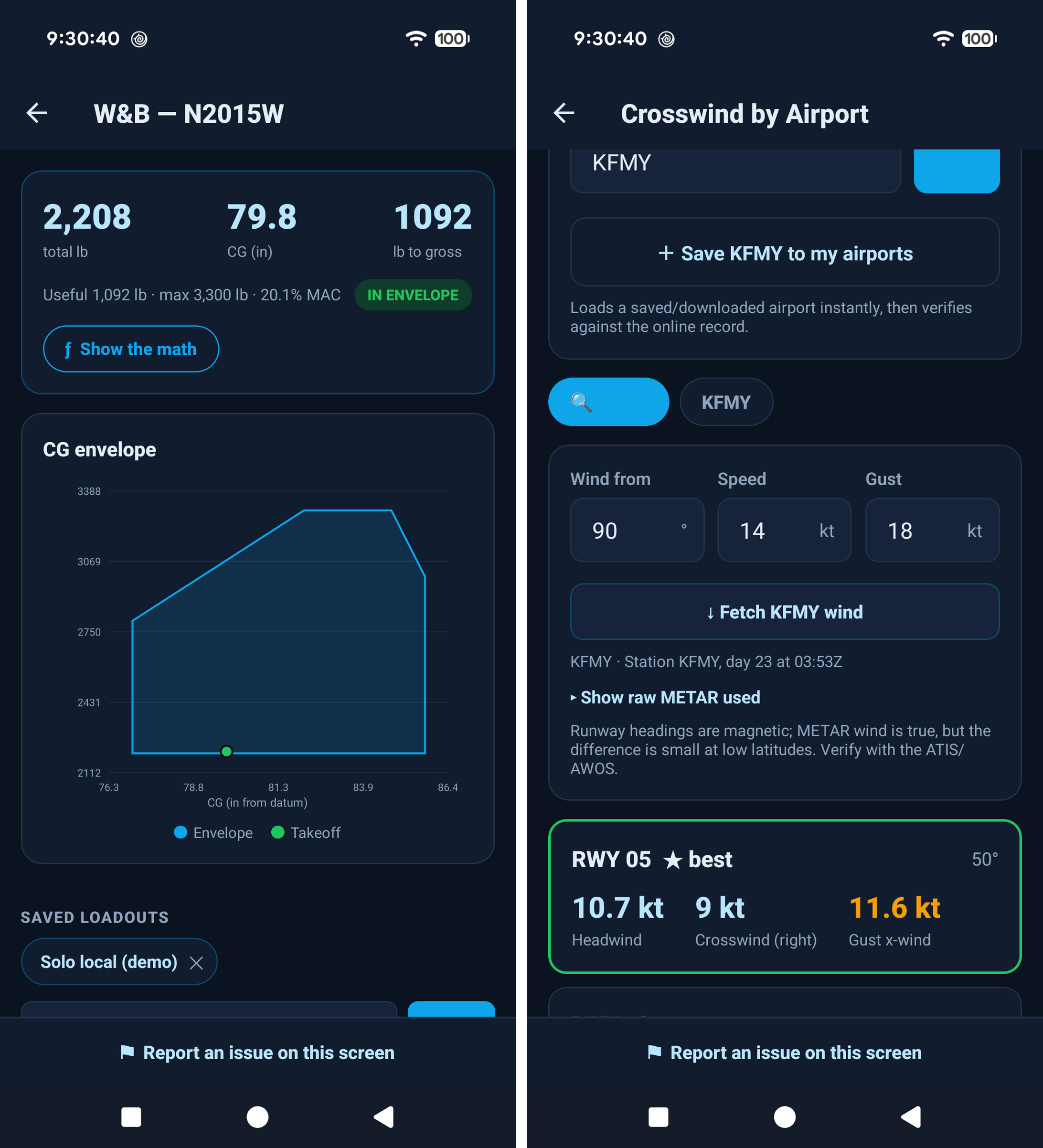
Load people, baggage, equipment, and fuel. See total weight, useful load, CG, and a graphical envelope. Check station limits, gross weight, landing and zero-fuel weight, and %MAC when configured.
Reusable people & equipment
Save a people roster, equipment items and groups, standard aircraft equipment, and loadout scenarios. Assign loads to stations instead of rebuilding the same setup every trip.
Route builder
Build legs from airports or manual coordinates. Choose an aircraft, altitude, wind, and cruise settings; set departure time, starting fuel, taxi fuel, and reserve. Review headings, groundspeed, time, and fuel by leg.
Live nav log
Use a large-type flight view, leg timer, and checkpoint timestamps. Compare planned and actual progress, see ahead/behind schedule, and review projected fuel and reserve. Save the flight record afterward.
Go / No-Go advisory board
Bring weather category, crosswind, density altitude, saved W&B, currency, documents, and daylight into one review. Set personal minimums and see the items that need attention.
Airport wind & route weather
Look up an airport, compare runway wind components, and inspect the source METAR. Review weather along saved routes, with cached reports and their age available for reference.
Airports, nearest & diversion
Save airports and runways, download airport packs by region, and search offline data. Use GPS to find nearby airports and review bearing, distance, and estimated diversion fuel.
Shareable flight paperwork
Export a PDF nav log or weight-and-balance sheet for your planning records. Keep a readable copy alongside your other flight documents.
KNOW THE AIRPLANE YOU OWN
Maintenance, ADs, squawks, and the cost of flying.
Keep the work that happens between flights alongside the tools you use to plan them.
Maintenance & ADs
Track maintenance tasks and airworthiness directives against an aircraft. Record due dates and aircraft-hour limits, monitor due-soon or overdue status, and track airframe hours as flights are logged.
Squawk tracking
Keep a list of aircraft discrepancies and track their resolution, so a small issue stays visible until it has been addressed.
Cost per flight hour
Explore how variable costs, monthly fixed expenses, and hours flown per month change your hourly cost. See what flying more or less does to the numbers.
Documents & expiry dates
Keep pilot and aircraft documents together with categories, photos or files, and expiry information. Review documents that are approaching expiry or already expired.
A deeper ownership picture is here.
Maintenance and AD detail pages now include compliance history, last-completed records, and next-due by hours or date—whichever comes first. Squawks track severity and repair costs, with a path into maintenance tracking.
Advanced ownership costs are built in too: insurance, hangar or tiedown, loan payments, maintenance reserves, and overhaul planning for one or more engines, rolled into a real cost per flight hour.
THE FLIGHT-COMPUTER TOOLKIT
Every calculator category, ready to explore.
From the everyday time–speed–distance problem to fuel planning, wind corrections, and loading calculations. Expand the math when you want to understand the result.
Time · speed · distance
Solve for time, speed, or distance and calculate estimated time en route.
Altitude & atmosphere
Pressure altitude, density altitude, ISA temperature and deviation, cloud-base and freezing-level estimates, cold-temperature correction, and ram rise / true OAT.
Airspeed
Calibrated-to-true and true-to-calibrated airspeed, plus Mach number.
Wind
Wind triangle, heading and groundspeed, headwind and crosswind components, and finding wind from observed heading and track.
Heading & navigation
True course through compass heading, 1-in-60 off-course correction, and great-circle distance and bearing.
Fuel
Endurance, range, required fuel, fuel burned, fuel economy, and actual burn rate.
Climb · descent · glide
Descent rate for an angle, climb/descent gradient, top of descent, crossing restrictions, and glide distance.
Maneuvers
Turn radius and rate, standard-rate bank, load factor, accelerated stall, maneuvering speed at weight, and pivotal altitude.
Instrument & holding
Holding-entry aid, gust factor, time and distance to station, visual descent point, FAF-to-MAP approach timing, and lead-turn distance.
W&B helpers
Useful load, weight to add for a target CG, and weight to shift for a CG change, with a shortcut to the full aircraft loader.
Takeoff & landing estimates
Start with your POH distances and explore density-altitude, wind, surface, and slope adjustments. These are planning estimates; your POH/AFM remains authoritative.
Unit conversions
Speed, distance, temperature, volume, fuel weight, weight, pressure, duration, fuel flow, climb/descent rate and angle, torque, and angles.
THE DETAILS THAT MAKE A FLIGHT DAY EASIER
All the supporting tools, together.
Zulu & local clocks
See both time references live and convert between Zulu and local time.
Stopwatch & countdown
Flight timers and a countdown for the tasks you want to time.
METAR / TAF decoder
Paste a report for plain-English decoding or fetch weather online. Review flight category and report times.
Sun & twilight times
Calculate sunrise, sunset, and civil twilight, displayed in Zulu and local time.
Custom checklists
Build normal and emergency checklists and work through them with tap-to-check items.
Passenger SAFETY briefing
Follow a passenger-briefing checklist before departure.
Reference cards
Quick-access aviation references, including light-gun signals, weather minima, codes, and the phonetic alphabet.
Pilot logbook
Record flight time and details, import ForeFlight CSV or XLSX data, and create an entry from a completed in-app flight.
Currency & training progress
Review currency information, document status, and progress toward supported private-pilot experience requirements using your records.
Learning mode
Practice wind-triangle problems, reveal the worked answer, and follow CX-3 / whiz-wheel guidance. Replay the quick app tour whenever you need it.
Search & cockpit preferences
Find calculators and tools with global search. Use a dark interface, optional red night overlay, and unit preferences.
Backup & restore
Export and restore a versioned local data backup. Keep original document files separately; document images remain device-local.
BUILT FOR LIFE BEYOND THE SIGNAL
Offline is part of the design.
Ready without a connection
- Flight calculators, supported Ask questions, and Show the math.
- Saved aircraft profiles, people, equipment, loadouts, and W&B.
- Saved routes, checkpoint nav logs, checklists, and reference tools.
- Local logbook, ownership records, and saved documents.
- Downloaded airport packs for lookup, nearest-airport, and diversion tools.
- Clocks, timers, sun calculations, and decoding pasted weather reports.
Prepare online, then take it with you
- Download the airport regions you need before departure.
- Fetch fresh METARs and TAFs while connected. Cached reports remain historical information—always check their age.
- GPS tools require location permission and a usable GPS fix.
- Fetching new weather, downloading data, and online services require a connection.
Core tools use your saved and entered data. Offline access does not turn cached weather into a current briefing.
BEFORE LAUNCH
A few things to know.
When can I download it?
Krosswind Computer is coming soon to Android and iOS. The Android app is in beta testing now; the public release date has not been announced. This page will be updated with a download link when it is available.
Does it come with my aircraft’s performance data?
Aircraft profiles are entered by you using your aircraft’s POH/AFM and current weight-and-balance information. Optional demo data helps you explore the app; it is not a substitute for your own aircraft’s data.
What will it cost?
Public launch pricing and the final feature packages will be announced before release.
Does it replace my approved flight references?
The app is a planning and reference aid. Verify inputs and results against the POH/AFM, official weather briefings, current charts, and approved navigation sources. The Go / No-Go board is advisory; the pilot makes the decision.
Built for the journey.
Flight math. Aircraft planning. Ownership details.
Krosswind Computer puts them within reach.
A Krosswind Aviation LLC app · Developed and published by Adroited LLC.